Call us(561) 921-0978Monday to Friday, 8am - 5pm ETSalesSupportLog in

AI for medical and dental practices

More time for patients. Less to catch up on.

ScribeSync answers calls, books visits, and follows up with patients. Get help with notes, dental charting, and billing too.

Start with the help your office needs. Add more when you’re ready.

From a patient call to a booked visitIllustrative call
Patient

“I’d like to make an appointment for Friday.”

ScribeSync

“I have Friday at 10:30 available. Would that work for you?”

Patient

“Yes, that works. Thank you.”

Friday, 10:30 AM

Appointment added to your schedule.

Follows your booking rules, including an insurance check when needed.

Find your practice

Help for the whole practice

Find the right help for your team.

Answer the phones, finish the chart, or get a claim ready. Start with what your practice needs most.

Office staff

AI receptionist

Answer calls to your office and reach patients who need a reminder or follow-up.

  • Book visits and check insurance
  • Handle refill, lab, and referral requests
  • Route hospital and other office calls
  • Collect IDs, insurance cards, and payments by text
See how calls are handled

Clinical team

Clinical notes

Get a draft note from each visit, using the format your practice already knows.

  • Templates for your specialty and visit types
  • Edit or regenerate your draft
  • Review suggested medical codes
  • Copy the finished note into any EHR
See clinical notes

Before the visit

Insurance verification

Get coverage questions answered before the patient arrives, with less verification work for your staff.

  • Check eligibility in real time
  • Verify before booking or before the visit
  • Call payers for missing information
  • See which questions still need your team
See insurance verification

Providers and coders

Medical coding

Help reduce avoidable coding denials and rework. Review suggested codes against the visit note before billing.

  • Use existing notes or our clinical scribe
  • Check codes against supporting documentation
  • Address coding issues before submission
  • Help improve first-pass claim acceptance
See medical coding

Billing team

AR follow-up calls

Find out what’s holding up payment without tying up your billing team on routine payer calls.

  • Follow up on unpaid and denied claims
  • Get claim status and missing information
  • Give staff the answer and a clear next step
  • Let your team focus on accounts that need them
See AR follow-up calls

Patient balances

Patient payments

Make it easier for patients to settle a balance. Call with a reminder and text a payment link right then.

  • Reach patients with unpaid balances
  • Text a payment link during the call
  • Use your connected payment system
  • Send billing questions to your team
See payment reminders and collection

Follow-up care

Reminders and recalls

Help patients remember their next visit and get those due for follow-up back on the schedule.

  • Call with appointment reminders
  • Book the next visit during a recall call
  • Reschedule in your connected calendar
  • Follow your office’s outreach instructions
See reminders and recalls

When your team is unavailable

After-hours support

Give callers help when your office is closed or your staff is already on another call.

  • Keep your current phone number
  • Book visits and gather refill requests
  • Follow hospital and on-call instructions
  • Choose the hours and overflow coverage you need
See after-hours coverage

Patient calls and refill requests

Refill calls shouldn’t take over your day.

When the refill calls keep coming, your staff needs more than another message to pass along. ScribeSync gathers the details and sends the request to the provider’s inbox through your EHR connection, following your refill policy.

See what ScribeSync can handle

Give the provider the details they need

Medication, pharmacy, and the information your refill policy requires, together in one request. Your provider reviews and approves it. Without an EHR connection, ScribeSync takes a message for your staff.

Refill requests

Help with lab-result calls

Handle report requests and calls about results using your office’s instructions. Questions that need a clinical explanation go to your team.

Lab-result calls

Help your office collect outstanding balances

A patient may have simply forgotten the bill. Call with a reminder, text a payment link during the conversation, and help them pay through your connected payment system.

Payment calls and links

Inside ScribeSync

See the work, from call to chart.

Know what happened on every call.

See which visits were booked, why patients called, and what still needs your team. Open a call to review the conversation and its outcome.

See how patient calls work
Your call overviewExample day
Calls handled
100
76 incoming · 24 outgoing
Appointments booked
24
Scheduled by ScribeSync
Need your team
8
Open follow-up tasks

What the calls were about

  • Appointments42
  • Refills28
  • Lab requests18
  • Other requests12

Refill requests go to your connected EHR inbox. If that connection isn’t available, ScribeSync takes a message for your team.

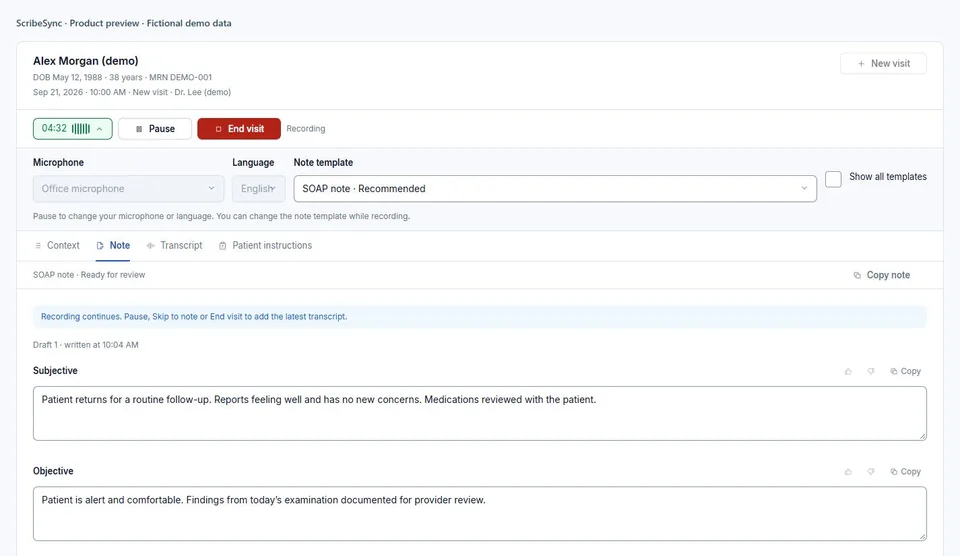
A draft note in your preferred format.

Choose a template for your visit. Change it to rewrite the draft, and pause or resume recording whenever you need to. Review your note and suggested medical codes before billing.

See how scribing works
ScribeSync during a fictional visit with a microphone meter, Pause and End visit controls, a note template selector, and a draft SOAP note.
Current product screen with fictional demo data.

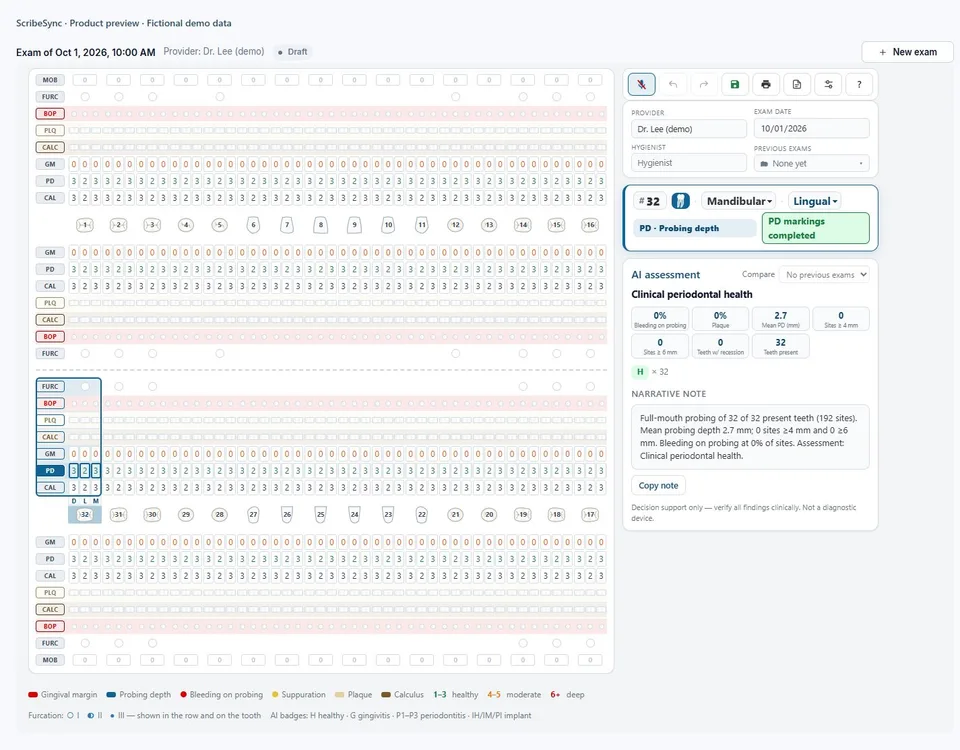
Call out the readings. Check the chart.

Keep your attention on the exam as you chart by voice. Review probing depths, bleeding points, and the completed chart before saving.

See how perio charting works
ScribeSync periodontal chart showing upper and lower arches, probing depths, and the exam summary using fictional readings.
Current product screen with fictional demo data.

Product overview with fictional example data. Not a live practice or measured customer result.

Interactive voice demo

Try a patient call in your browser.

Ask to book a visit, request a refill, or speak with the front desk. Use your microphone to talk with ScribeSync. You don’t need a phone number.

Choose a situation and we’ll give you fictional patient details to use. You can also answer an appointment reminder from the office.

A conversation you can try

A few things to try

  • “I’d like to make an appointment.”
  • “I need a refill on my medication.”
  • “Could you put me through to the front desk?”
Try a web callArrange a live demo

Please use made-up details for the demo.

EHR integrations

Keep using your EHR.

Use ScribeSync with eMedicalPractice or eDental. With a supported connection, appointments go into your schedule and refill requests reach the provider’s EHR inbox.

Your EHR isn’t connected yet? You can still use the scribe. Review your note, copy it to the clipboard, and paste it into your EHR. Direct connections may need setup and vendor fees.

Connected today

eDentalSee how the connections work

Getting started

Let’s make it work for your office.

  1. Show us your day.

    Tell us what keeps your team busy. We’ll show you the products that can help.

  2. Make it yours.

    We’ll go through your software, office policies, and the tasks you want ScribeSync to handle.

  3. Try it with your team.

    Review sample calls, notes, or charts together before you start using it with patients.

Common questions

Before you get started

Looking for something specific? Each product page has more answers.

Do we have to change our phone number?

No. Keep your current number and forward calls to ScribeSync, or transfer the number to us. We’ll help you choose the setup that works with your phone service.

Keep your number
Can it check insurance and book the appointment?

Yes. ScribeSync can check insurance before booking, offer available times, and add the appointment directly to your connected schedule. Your office decides what needs staff review.

Appointments and insurance
Will it work with our EHR or dental software?

You can copy your reviewed note into any EHR without an integration. eMedicalPractice and eDental are connected today. Direct booking, inbox routing, and chart transfer need a supported connection. Setup and vendor fees may apply.

See integrations
Can refill requests go directly to the provider?

Yes. With an EHR connection, the request goes to the provider’s inbox with the medication and pharmacy details. The provider approves the prescription. Without a connection, ScribeSync takes a message for your staff.

Refill requests
Can we use medical coding with our existing notes?

Yes. ScribeSync suggests codes from the clinical documentation you already have. Your provider or billing team reviews them before billing. You don’t need to use our scribe.
Medical coding

Choosing what’s right for your office

Take a closer look.

See ScribeSync in action

See how ScribeSync would work in your practice.

We’ll show you the products your team needs and explain how setup and pricing work.

Book a demo
ScribeSync

Getting the demo ready…
